
PARAMEDIC OPS / INVENTORY
InventoryMake readiness part of the routine.
A practical operating system for EMS supplies, vehicles, equipment, and accountability. Follow stock from receiving to the truck, see what needs attention, and keep the history behind every movement.
For providers, inventory teams, fleet and equipment leads, and agency administrators.
THE COMPLETE FEATURE OVERVIEW
What’s inside Inventory.
Explore the tools by workflow. Features shown depend on your roles, enabled modules, and agency configuration.
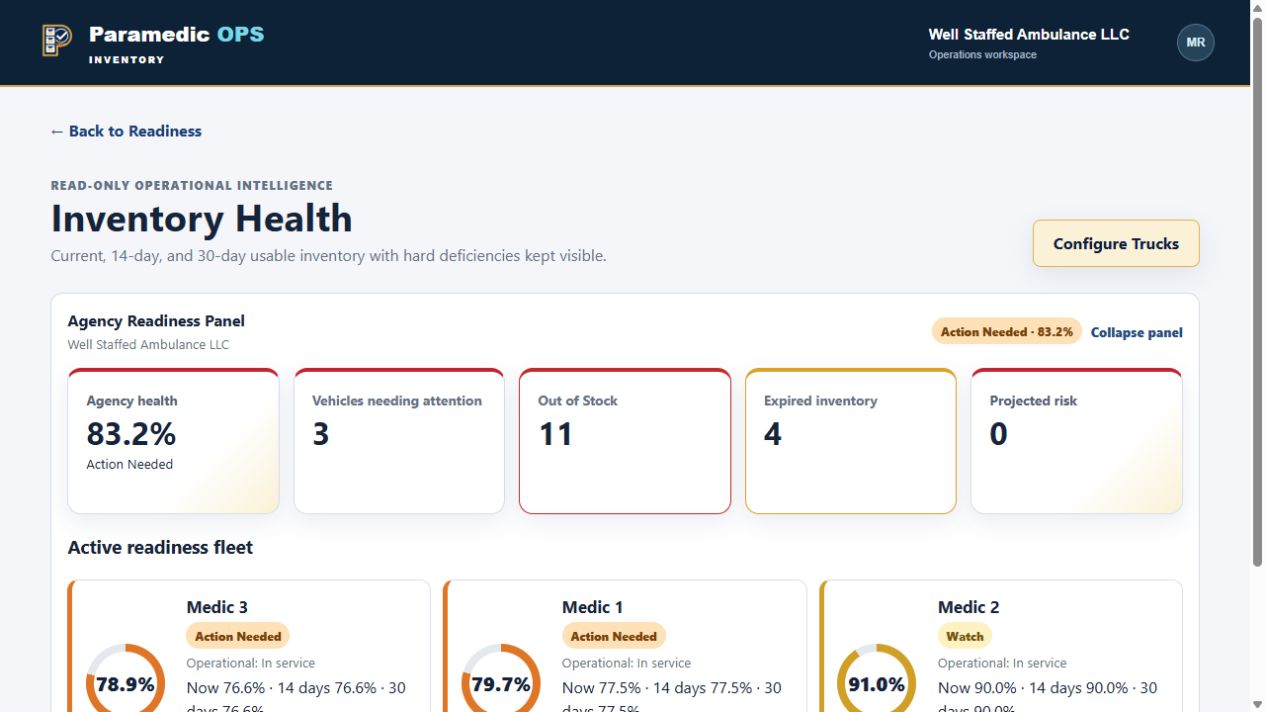
Readiness & inventory health
A clearer picture of the stock available to support the next response.
- Agency and individual vehicle readiness views
- Current, 14-day, and 30-day inventory projections
- Usable stock compared with configured vehicle PAR levels
- Visible out-of-stock, below-PAR, and expired-item concerns
- Supply Room Health and searchable inventory details
- Assigned portable assets included in vehicle readiness
Everyday crew workflows
Put routine supply work where crews can act on it.
- Record a Call with scanned or searched replacement supplies
- Configurable Quick Procedures to help fill a supply cart
- Lot-specific vehicle restocking and supply replacement
- Separate missing, overstock, damaged, and expired-stock corrections
- Vehicle and crew assignment for the working shift
- Report supply problems directly from the provider workspace
Vehicle shift checklists
Guide the check, save the evidence, and support the next crew.
- Configurable checklist sections, steps, and answer choices
- Shared checklists for the assigned crew and vehicle
- Saved responses with Save and Exit support
- Editing protection against simultaneous overwrites
- Cabinet-code and seal verification
- Issue reporting and inventory correction from applicable steps
- Conditional narcotics custody through its signed workflow
Catalog, locations & PAR
Structure inventory around the places and products your agency uses.
- Items linked to approved manufacturer products and barcodes
- Vendor catalogs, SKUs, package sizes, and unit conversions
- Reusable templates for vehicles, storage, and portable assets
- Nested cabinets, shelves, pouches, and compartments
- Template-owned vehicle and portable-asset PAR levels
- Supply Room minimum and maximum stocking targets
- Retirement of configuration records while preserving history
Purchasing & vendor comparison
Build orders from stock needs and compare the evidence behind purchasing.
- Needs-Based Ordering and resumable combined drafts
- Vendor-specific purchase orders created at finalization
- Recommendations accounting for readiness, expiration loss, and open orders
- Advisory demand forecasts shown separately from baseline needs
- Vendor package rounding and purchasing-unit checks
- Side-by-side received-price comparison by manufacturer
- Normalized unit prices and receipt-time package conversions
- Audited corrections to submitted order quantities and prices
Receiving & stock movement
Keep incoming supplies and outstanding orders connected.
- Purchase-order receiving into configured Supply Room locations
- Partial receipts and visible outstanding quantities
- Backorder review and authorized closure
- Lot and expiration capture for tracked products
- Separate controlled-substance receiving workflow
- Returns, replacements, and stock corrections with movement history
- Completed-order archiving that retains receiving records
Counts & discrepancy research
Check what is physically there without losing the record of what changed.
- Spot counts for vehicles, locations, and portable assets
- Touch-oriented cards showing expected quantity and PAR
- Independent section assignments and editing protection
- Variance research and review before reconciliation
- Audited Count Add and Count Remove ledger events
- Opening balances through the initial-inventory count workflow
- Verified sealed-module handling when eligibility checks pass
Expiration & quarantine
Find aging supplies and keep unusable stock out of the readiness picture.
- Agency-wide expiration review and pull workflows
- Expired, near-expiring, and custom date windows
- Grouped vehicle and portable-asset inventory
- Quarantine and replacement from newer Supply Room stock
- Supply Room minimum protections during supported replacements
- Reasoned deferral and partial near-expiration pulls
- Tracked shortages, retry errors, and completed movement evidence
Narcotics accountability
Restricted workflows and a dedicated ledger for controlled substances.
- Explicit narcotics eligibility and role permissions
- Kit contents defined by versioned templates
- Exact medication presentations, concentrations, and NDCs
- Signed custody, transfers, use, and witnessed waste
- Restock, audits, seal history, and discrepancy review
- Safe stock, quarantine, expiration, and destruction workflows
- Protected ledger reports and filtered CSV / Excel exports
Equipment, fleet & vehicle swaps
Track durable assets as they move with the operation.
- Numbered portable assets and compatible vehicle slots
- Equipment custody, inspections, and quality-control records
- Vehicle service tracking
- Vehicle and portable-asset swap previews
- Warnings for missing equipment and inventory deficiencies
- Separate narcotics-transfer and readiness checks
- Return-to-Service follow-up and audited exception handling
Team coordination & uniforms
Keep supporting operational work in the same workspace.
- Inventory issues with ownership and status history
- Inventory Team Hub messages, direct messages, and shared tasks
- Uniform requests with item and size selection
- Uniform inventory, fulfillment, and embroidery workflows
- In-app help and contextual app-feedback submission
- Inventory Academy basic-user lessons and saved learning progress
Reporting, access & history
Turn daily work into evidence you can review.
- Balances, movements, shortages, and usage reporting
- Shrink, risk, expiration, and correction reports
- Vendor performance, receiving exceptions, and reorder effectiveness
- Role-based provider, inventory-team, and administrator access
- Separate permissions for sensitive narcotics and financial reports
- Immutable posted ledger history and linked correction events
- Audited sensitive report views and CSV / Excel exports
SEE THE EVERYDAY IN ACTION
A closer look
at Inventory.
Follow agency readiness down to a vehicle and the supplies that need attention.
An 18-second captioned walkthrough using presentation copies of application screens and illustrative Well Staffed Ambulance LLC records.
LET’S TALK ABOUT YOUR OPERATION
See Inventory
with your team in mind.
Tell us about your workflow and the capabilities you’re looking for.
Request a Inventory demoEXPLORE THE REST OF THE SUITE